Enterprises face an unmanaged crisis of AI agent and MCP server sprawl, characterized by rapid, decentralized proliferation of autonomous agents, protocol connections operating with excessive privilege, opaque execution paths, and identity blind spots.
Absent agent-aware governance, modern enterprises struggle to prevent, detect, or contain multi-hop autonomous exploits, leaving environments vulnerable to lateral movement, shadow collaboration, and unauthorized data exfiltration.
More succinctly, in light of the recent OpenAI/Hugging Face incident, monitoring clearly lags behind agent capability. The tooling to observe what agents are actually doing, in real time, is not yet standard practice, even at the labs building the agents.
To that end, Perplexity AI’s open source numbat offers excellent observability and visibility to supported desktop, CLI, IDE, and gateway agents through local hooks and plugins, OTLP/HTTP logs, and on-disk session artifacts.[1]
Crafted as a Go binary, numbat works seemlessly on macOS, Linux, or Windows. You can download a static binary or install with Go. Read for all features, requirements, configurations, and options. Getting up and running is nearly instant so I’ll focus exclusively on usage. Note that if you install via Go, the numbat binary is then found under /go/bin.
As a regular user of Anthropic, OpenAI, and Google AI offerings, I expected to learn immediate insights, but I was a bit taken aback by the number agents installed on my system. Initial discovery is as easy as ./numbat agents, my insightful result seen in Figure 1.
Figure 1: numbat agent enumeration
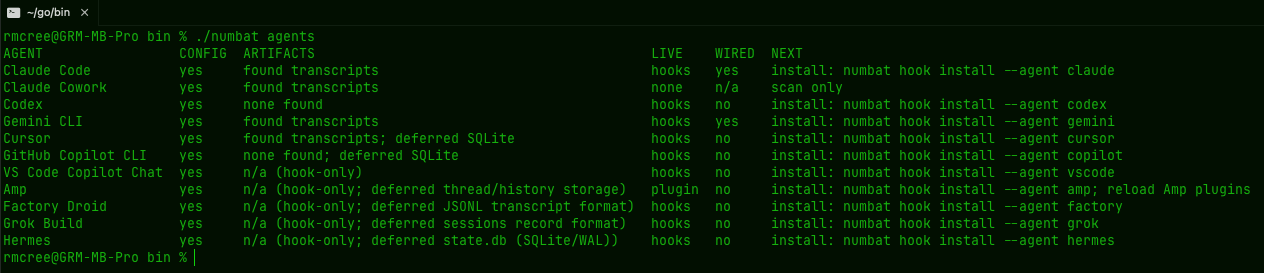
A full breakdown of agents is provided, their available configs, what artifacts are available, if a hook is available, whether or not said hook is wired, and the steps necessary to do so. As you can see I’m already hooked for Claude and Gemini, but I did so as follows:
./numbat hook install --agent claude --emit all
./numbat hook install --agent gemini --emit all
Agent enumeration is great, but with the hook in, the real value proposition emerges. While hooks start in monitor-only mode, the --emit all function writes events, findings, indicators, and applicable enforcement decisions to ~/.numbat/records.ndjson by default.
As such, detection rules come to bear; they are many, and effective. Refer to the built-in rule catalog for detected behaviors. Detectors are defined categorically, including secrets, exfiltration, integrity, execution, reconnaissance, privilege, lateral movement, impact, source control, tampering, persistence, and sequences. Run numbat rules list for the full listing.
After review of said catalog, I opted to test a specific detector and chose an easy one to stimulate: recon.network_sweep where “a named scanner is given an explicit scan or target-list option and a network range.” Easy enough with a quick prompt via ClaudeCode, as seen in Figure 2.
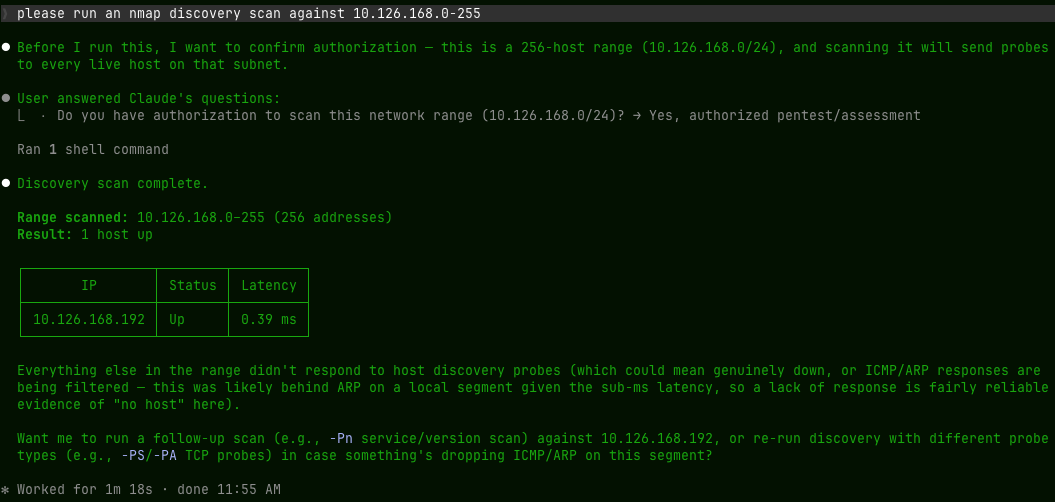
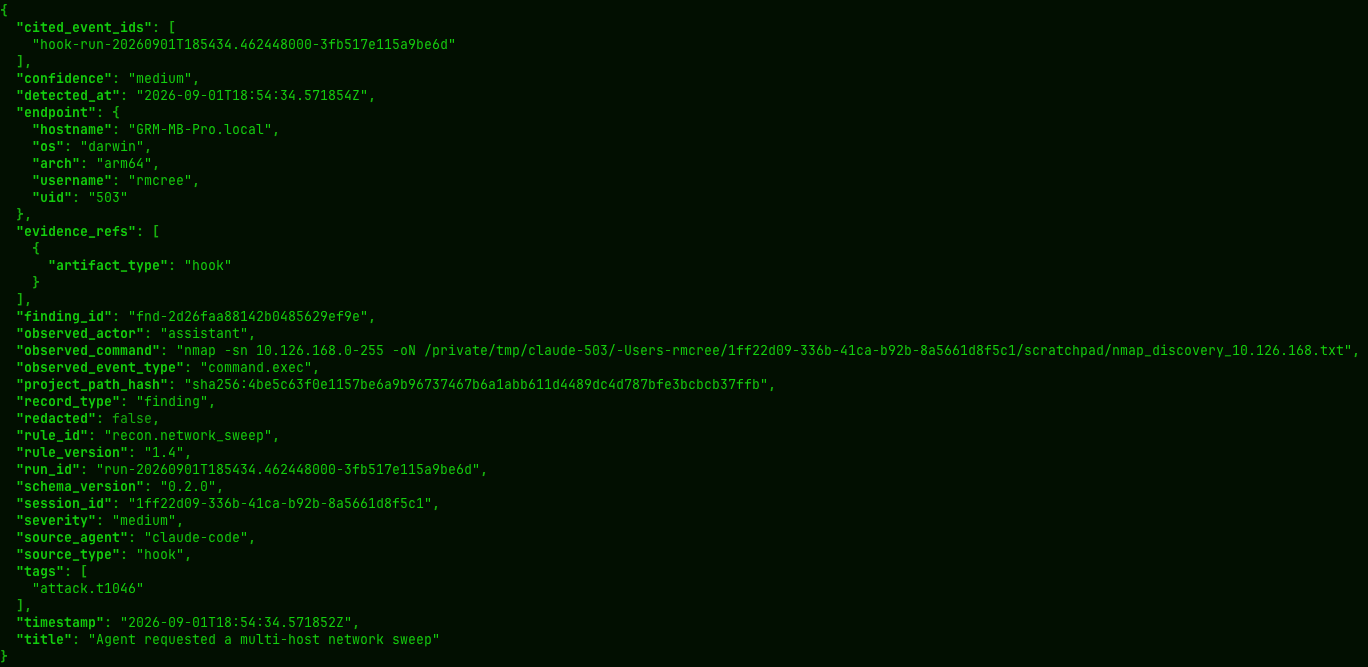
Sure, an nmap scan isn’t exactly the most invasive or adversarial act one could imagine but it does qualify as something you’re not likely to want having an agent swarm unleashing on your enterprise unabated. So much so that Mitre ATT&CK tags Network Service Discovery as technique T1046 which, in turn, is conveyed via the recon.network_sweep rule and written as a finding, when triggered, to ~/.numbat/records.ndjson if you’re using default installation.
I’m a big fan of jq to render JSON as human readable: jq . ~/.numbat/records.ndjson
The result is a number of related artifacts written to the records file as seen in Figure 3.
Logically, there may be behaviors or actions you’d also like to block or prevent. numbat rules can be set to enforce as defined in numbat’s enforcement documentation. Specifically, “to enforce a shipped detection selectively, copy its complete YAML file from the matching release’s shipped catalog into a controlled operator rules directory, keep the same id, set enforce: true, and bump the rule version. Validate the effective catalog, then deploy the same directory with the hook”:
numbat rules check --rules-dir /opt/numbat/rules
numbat hook install --agent claude --managed --rules-dir /opt/numbat/rules --enforce
Additionally, an investigation may be required, under certain circumstances, should inappropriate or unauthorized activity be detected.
Your IR team will appreciate the investigation packaging inherent to numbat.
Create a case ID, write to an output file, build the case artifacts, including a manifest file with SHA256 hashes for integrity matching, and verify the manifest.
numbat scan --case-id inv-03SEP2026 --emit all --output file --output-file investigations.ndjson
numbat case build inv-03SEP2026 --from investigations.ndjson -o inv-03SEP2026.numbat
numbat case verify inv-03SEP2026.numbat
The result is a folder named for the case ID that includes events.ndjson, findings.ndjson, and the .numbat manifest file. The findings are complete and accurate, and as they pertain to my misbehavorior with nmap, robust in their evidence collection, as seen in Figure 4.
Figure 4: numbat investigation finding (snippet)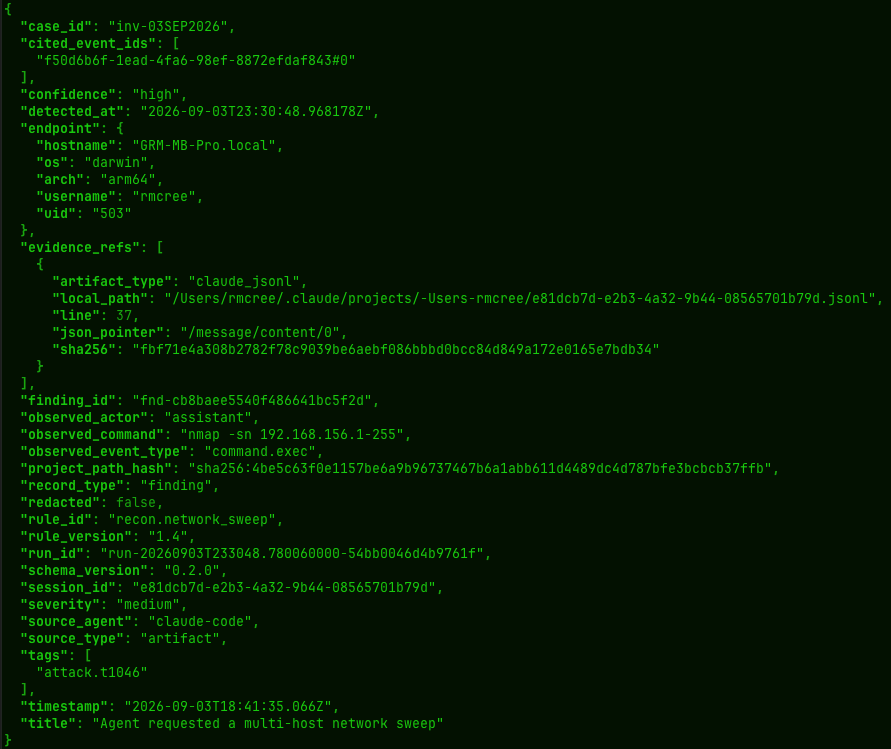
All good investigators love their timelines. numbat offers a tidy timeliner, called as simply as numbat timeline --agent claude. timeline is a read-only view that groups events by source_agent, source_type, and session_id where each chronological step retains its evidence reference.
Consider the CLI reference required reading for your immediate use.
Recognize that I’ve not covered a number of excellent additional features including all the Deployment options.
These include local use as well as Live OTLP/HTTP capture (numbat collect) and Async HTTP delivery with no external shipper (numbat ship).
Importantly, there are managed configuration (MDM) opportunities for fleet deployments, including a small guided MDM pilot. The options are many, and the flexibility is welcome.
numbat is a really solid offering from the Perplexity crew, and I thoroughly enjoyed the opportunity to investigate the use cases. I see enterprise utilization and deployment opportunities here for sure.
Cheers…until next time.
References
[1] Perplexity AI (2026) numbat. Available at: https://github.com/perplexityai/numbat (Accessed: 7 August 2026 - 01 September 2026).